
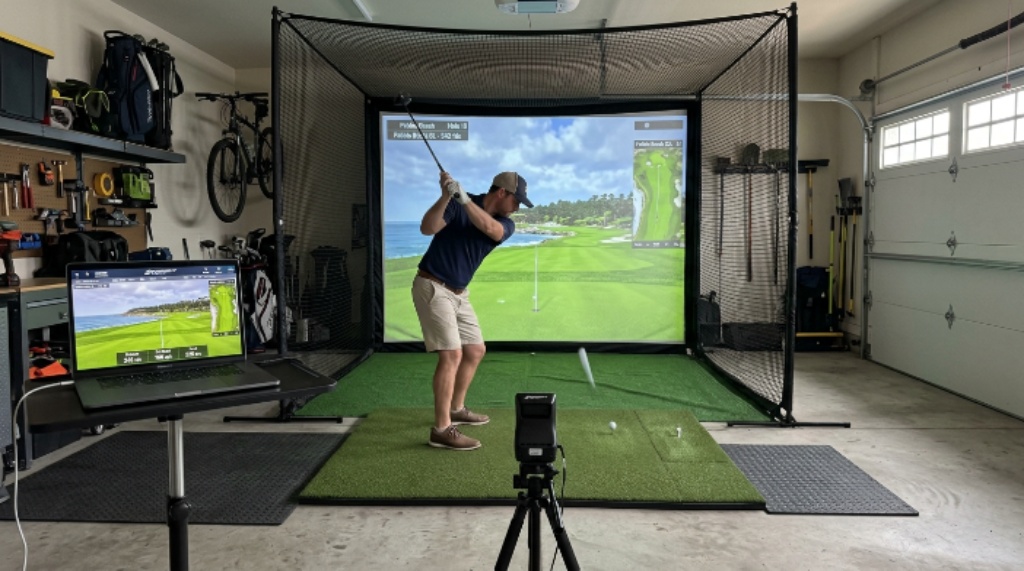
Golf is one of those sports that can quickly become expensive. Green fees, club memberships, and driving range visits add up fast. However, there is a smarter way to keep practicing without leaving your house. Building a home golf simulator lets you play and improve your swing any time you want. The best part? You do not need a huge budget or a dedicated room to make it work. With a laptop and a few carefully chosen components, you can set up a solid simulator that feels close to the real thing.
This guide covers everything you need to know, from the basic equipment to software choices and space planning. By the end, you will have a clear plan to build your own setup without overspending.
Why a Home Golf Simulator Makes Sense in 2026
The cost of playing golf has risen steadily over the years. A single round at a decent course can cost anywhere from $50 to over $150. Over a full season, those costs grow quickly. A home setup, by contrast, is a one-time investment that pays for itself within months.
Additionally, practicing at home means no travel time, no tee time bookings, and no weather problems. You can hit balls in January just as easily as in July. This consistency is one of the biggest factors in improving your game. Golfers who practice regularly, even indoors, tend to develop better muscle memory and course management skills.
Therefore, building a home golf simulator budget setup is not just a convenience. It is a long-term investment in your game and your time.
Understanding the Core Components
Before you spend a single dollar, it helps to understand what a golf simulator actually needs. Every setup, whether basic or advanced, relies on the same four core parts.
The first is a launch monitor. This device tracks your club and ball data. It measures swing speed, ball speed, launch angle, spin rate, and shot direction. The launch monitor is the brain of your simulator. Without it, the system cannot calculate where your ball would actually land.
The second component is a hitting mat. This replaces the turf and gives you a realistic surface to swing from. A good mat protects your floors and absorbs impact without damaging your wrists or clubs.
The third is an impact screen or net. The ball needs somewhere to go. An impact screen lets you project your shot results onto it. A basic net simply stops the ball and works well if you are not using a projector.
The fourth is software. Golf simulation software runs on your laptop and processes the data from your launch monitor. It displays a virtual course and calculates ball flight based on your real swing data.
Choosing a Launch Monitor for a Budget Setup
The launch monitor is where most of your budget will go. Fortunately, affordable options have improved dramatically in recent years. You do not need a $10,000 professional unit to get useful data.
Entry-level launch monitors priced between $200 and $600 offer solid performance for home use. They connect to your laptop via Bluetooth or USB and work with several popular software platforms. Look for a model that tracks at least ball speed, launch angle, and carry distance. These three metrics give you enough feedback to practice effectively.
Some popular affordable options use camera-based tracking. Others use radar or infrared sensors. Camera-based systems tend to work better indoors where radar might pick up interference. Check compatibility with your chosen software before buying.
Picking the Right Software for Your Laptop
Your laptop is the control center of your entire setup. Golf simulation software has become impressively capable, even at lower price points. Several platforms offer free trials, which means you can test before committing.
When choosing software, consider three things. First, check the system requirements. Most simulation software runs smoothly on a mid-range laptop with at least 8GB of RAM and a dedicated graphics card. Second, look at the course library. More courses mean more variety and longer engagement. Third, check which launch monitors the software supports.
Some software options offer subscription plans as low as $15 to $30 per month. Others charge a one-time fee. For a DIY golf simulator setup on a tight budget, a subscription model lets you start cheap and upgrade later if needed.
Setting Up Your Space at Home
You do not need a warehouse. However, you do need enough room to swing a club safely. The minimum recommended space is around 10 feet wide, 10 feet tall, and 15 feet deep. This gives you room to swing without hitting walls or ceilings.
A spare bedroom, garage, or basement works well. Garages are particularly popular because they offer high ceilings and durable floors. If your garage has a concrete floor, place your hitting mat on a rubber underlayer for extra cushioning.
Lighting matters more than most people expect. Avoid placing the setup near windows where sunlight can interfere with camera-based launch monitors. Consistent, even lighting improves tracking accuracy and makes the projected image easier to see.
Additionally, consider cable management early. Your laptop, projector, and launch monitor will all need power. Running cables neatly along the walls keeps the space tidy and prevents tripping hazards.

Building the Screen and Projection Setup
For a true simulator experience, you want to project your shot onto a screen. A basic impact screen made from a white polyester or canvas material works well and costs between $100 and $300. Mount it to a simple frame made from PVC pipe or metal conduit. Both materials are inexpensive and easy to cut and assemble.
Position your projector behind you or above you, pointing at the screen. Short-throw projectors work best in tight spaces because they do not need much distance to create a large image. A decent short-throw projector costs between $200 and $500.
Connect the projector to your laptop using an HDMI cable. Most simulation software automatically detects the second display and mirrors the course view onto the screen. The result is a surprisingly immersive experience at a fraction of professional simulator costs.
Estimating Your Total Budget
Here is a realistic cost breakdown for a functional home setup:
- Launch monitor: $200 to $600
- Hitting mat: $80 to $200
- Impact screen and frame: $100 to $300
- Short-throw projector: $200 to $500
- Simulation software (annual): $200 to $400
- Miscellaneous (cables, lighting, rubber mat): $50 to $100
Total estimated range: $830 to $2,100
This is a wide range depending on the quality of each component. However, even at the higher end, this is far less than the cost of a pre-built professional simulator, which can easily run $5,000 to $20,000 or more. A thoughtful home golf simulator budget plan puts a great experience well within reach for most golfers.
Tips to Stretch Your Budget Further
Smart shopping makes a significant difference. Consider these strategies to keep costs down:
- Buy a used launch monitor from a reputable seller. Many golfers upgrade their equipment and sell older models at deep discounts.
- Use a large white bed sheet as a temporary screen while you save for a proper impact screen.
- Look for software bundles that include multiple courses and features in one flat fee.
- Build your own frame using materials from a hardware store instead of buying a pre-made enclosure kit.
- Start with a basic net instead of a projector. You can always add the screen and projector later as your budget allows.
Patience pays off here. Building your setup in phases means you start practicing sooner without waiting until you can afford everything at once.
Maintenance and Longevity
A well-maintained simulator lasts for years. Replace your hitting mat when the surface shows significant wear, usually after one to three years of heavy use. Keep your launch monitor clean and store it safely when not in use. Update your simulation software regularly to access new courses and bug fixes.
Furthermore, check your impact screen periodically for small tears. A minor tear left unattended can spread quickly. Most screen materials are repairable with a basic patch kit.
Conclusion
Building a DIY golf simulator at home is entirely achievable, even on a modest budget. The key is understanding which components matter most and making smart choices at each step. Start with a reliable launch monitor, pair it with quality software on your laptop, and build your space around the room you already have. From there, add a screen and projector when you are ready.
A thoughtful home golf simulator budget plan means you spend less, practice more, and improve faster than if you relied on expensive tee times alone. Whether you are a weekend golfer or someone chasing a lower handicap, this kind of setup gives you a real advantage. The technology in 2026 makes it easier than ever to bring the course to your living room — without breaking the bank.
Frequently Asked Questions
What is the minimum space needed for a home golf simulator?
You need at least 10 feet wide, 10 feet tall, and 15 feet deep. A garage or basement usually works perfectly. Always measure your ceiling height before buying any equipment.
Can I use my existing laptop for golf simulation software?
Most modern laptops work fine. Aim for at least 8GB of RAM and a dedicated GPU for smooth graphics. Check the software’s minimum system requirements before downloading.
Do I need a projector, or can I just use a monitor?
A large monitor or TV can work as a screen alternative. However, a projector gives you a much more immersive experience. A 100-inch projected image feels far more realistic than even a large TV screen.
How accurate are budget launch monitors?
Entry-level launch monitors are accurate enough for practice and improvement. They may not match the precision of professional units, but they provide reliable data on the metrics that matter most for most golfers.
Can I play real golf courses on simulation software?
Yes. Most golf simulation platforms include licensed versions of well-known real-world courses. Some libraries include hundreds of courses from around the world, which keeps practice sessions fresh and engaging.
Related Topics:
How to carry out a workplace first aid needs assessment
What Is the 20/40 Rule for Saving? A Simple Guide to Smarter Money